
When you set up an OtterlyAI account, you add the search prompts you want to track for brand visibility and website citations. Prompts can be added manually via the Add Prompts button or discovered using the AI Prompt Research tool.
Once added, your prompts are automatically monitored daily across all AI search engines available in your account.
→ Find more about how to add prompts
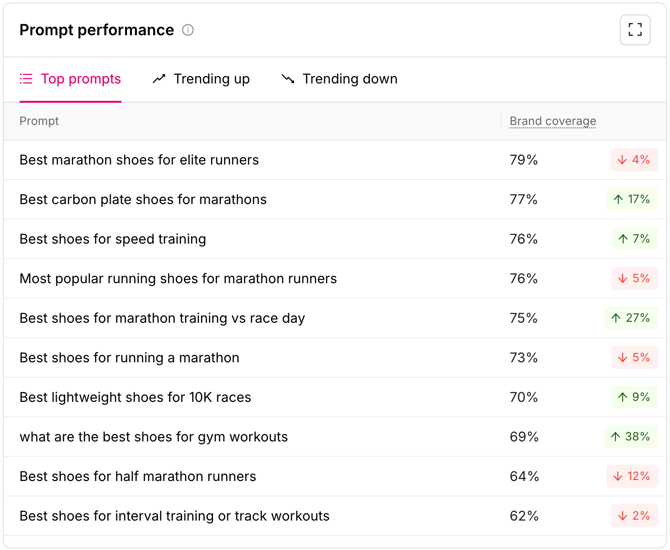
Prompt performance
The table within the brand report overview shows you how your brand performs on individual prompts. The share of AI answers for that prompt that mention your brand.
There you'll see:
- Top prompts lists the prompts where you are performing well.
- Trending Up lists the prompts where your performance is improving.
- Trending Down lists the prompts where your Brand Coverage is slipping.
The Prompts tab
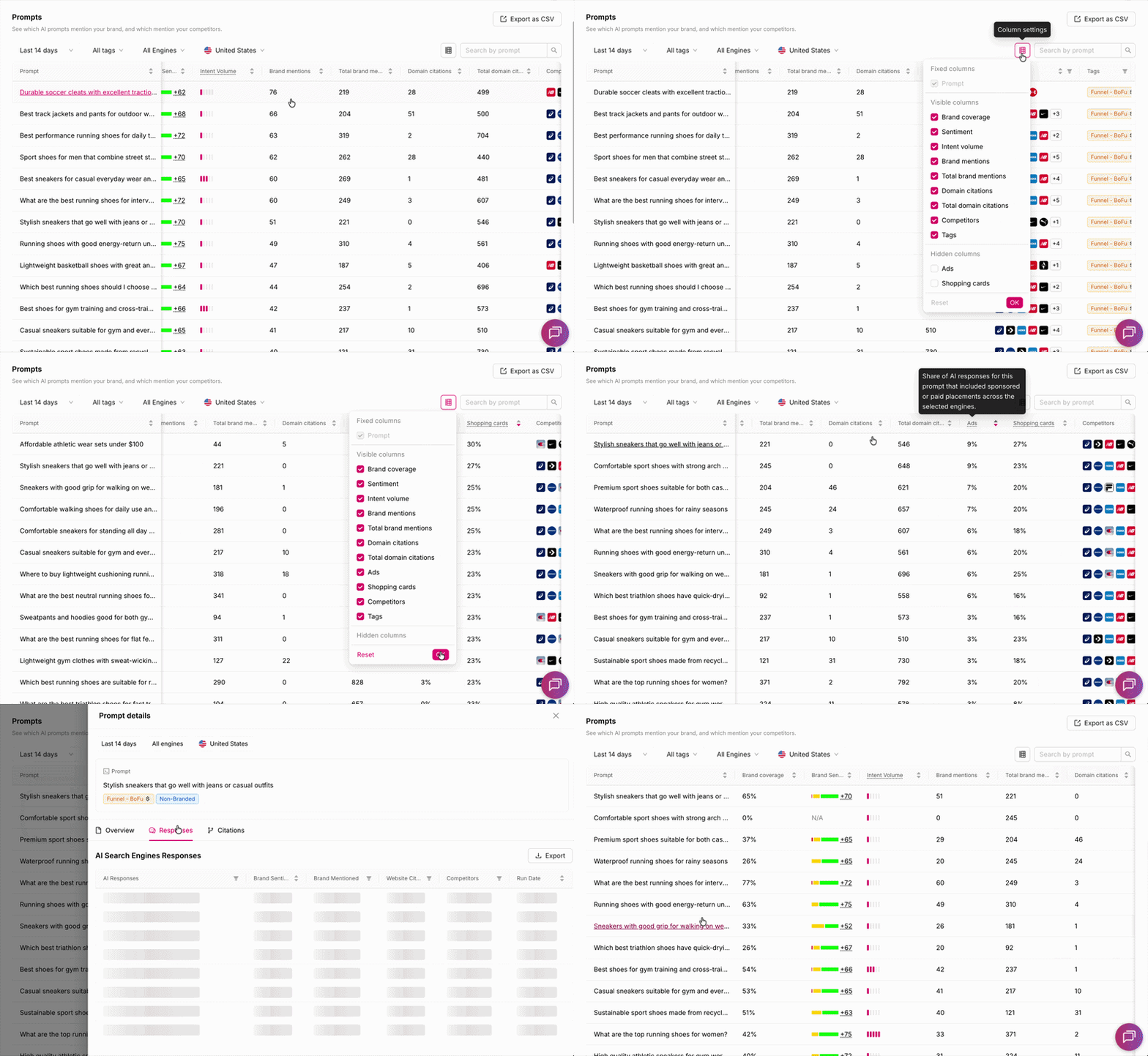
The Prompts tab within the brand report is your central view for understanding how each prompt performs across AI search engines. Each row represents a single prompt, and each column gives you a specific performance signal.
You can customize your view using column settings, show only the metrics you need, hide the ones you don't, and add columns like Ads and Shopping Cards.
Column reference
Prompt
The exact text of the search prompt being monitored.
Brand Coverage
The share of AI responses for this prompt that mention your brand.
Brand Sentiment Score
The average sentiment of AI responses that mention your brand for this prompt.
Intent Volume
An estimate of how frequently this type of query is searched across AI engines.
Brand Mentions
How many times your brand appeared across all AI responses collected for this prompt.
Total Brand Mentions
The cumulative brand mention count across runs for this prompt.
Domain Citations
How many times your domain was cited as a source in AI responses to this prompt.
Total Domain Citations
The cumulative citation count across runs for this prompt.
Ads
The share of AI responses for this prompt that included a sponsored or paid placement.
📺 See Ads & Shopping tracking in action:
Watch the video tutorial →
→ ChatGPT Ads Are Here: Full tracking now live inside OtterlyAI
Shopping Cards
The share of AI responses for this prompt that included shopping results.
Competitors
The competitor brands that appear in AI responses.
Tags
Labels you've assigned to this prompt for easier filtering and organization across your workspace.
Viewing prompt-level detail
Click on any individual prompt to drill into the full monitoring breakdown, response-by-response data, citation detail, and engine-by-engine performance.
→ Learn more about prompt detail analysis