
OtterlyAI’s Prompt Detail Analysis gives you a deep dive into how your brand appears in AI-powered search engines like ChatGPT, Google AI Overviews, Perplexity, Gemini, and Microsoft Co-Pilot.
The page is organized into three main tabs:
-
Overview – High-level insights and trends for the selected prompt
-
Responses – Detailed AI search engine response
- Citations – URLs used as a source
🔍 Key Insights You’ll See in the Overview Tab
Competitor Ranking
- Lists brands mentioned in AI answers for the prompt.
- Ranks them based on frequency and prominence.
- Allows you to track your position against competitors over time.
Brand Coverage Over Time
This chart shows how often brands are mentioned over time for the selected prompt.
-
Tracks brand presence across AI responses day by day
-
Helps identify trends, spikes, or drops in visibility
-
Useful for monitoring the impact of content
Each line represents a brand, making it easy to compare performance against competitors.
.png?width=624&height=419&name=Screenshot%20(14).png)
.png?width=624&height=447&name=Screenshot%20(15).png)
💬 What You'll Find in the Responses Tab
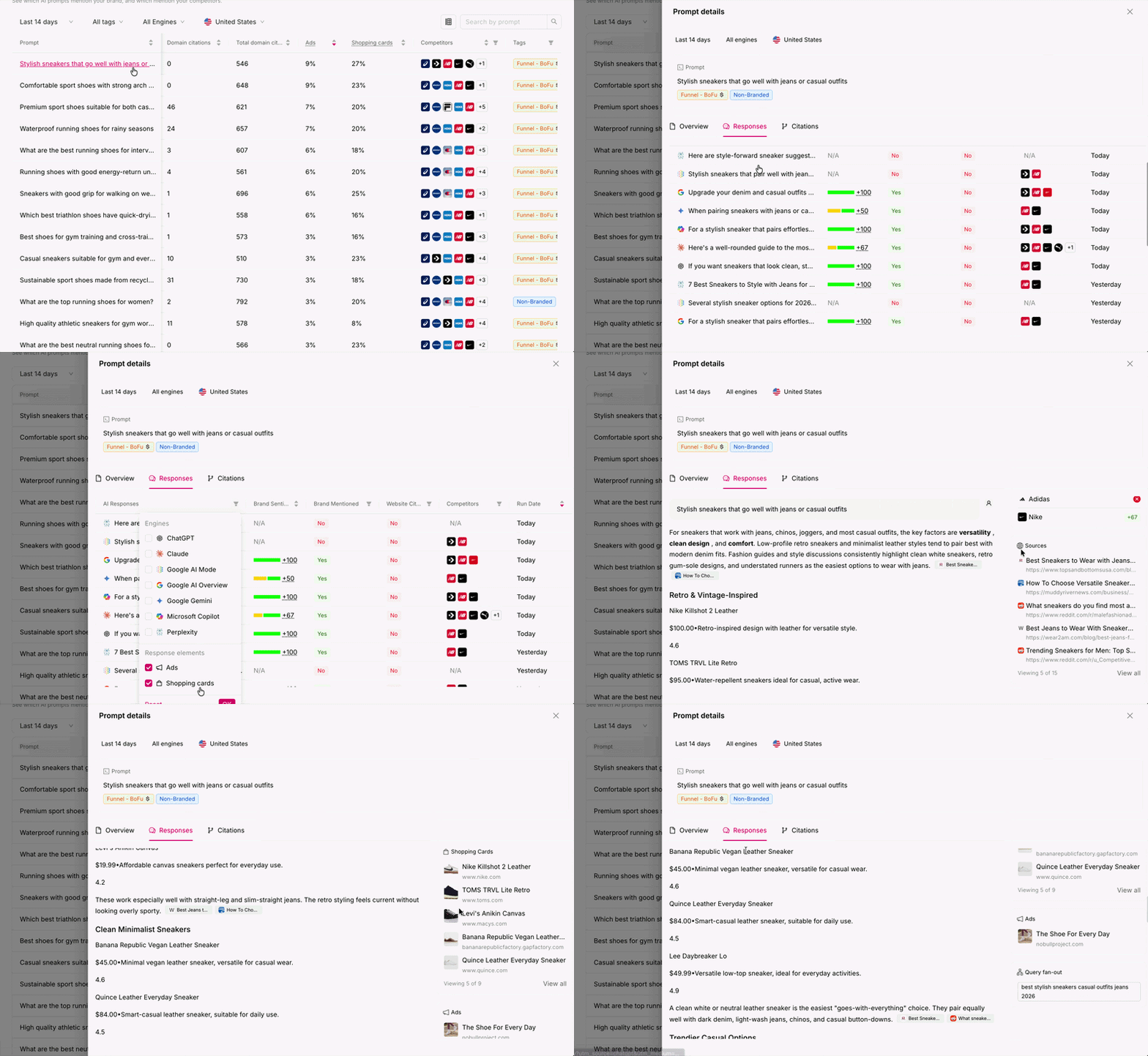
The Responses tab shows the actual responses returned by AI search engines for the selected prompt.
Each column represents a single AI response run and includes:
-
AI Response – A preview of the generated answer
-
Brand Mentioned – Whether your brand appears (Yes / No)
- Brand Sentiment - NSS score of your brand for this prompt
- Domain Cited – Whether your domain was cited (Yes / No)
-
Competitors – Any tracked competitors found in the response
-
Run Date – When the response was collected
Filtering responses
You can filter the Responses tab to focus on exactly what matters. Filters can be combined.
By Engine:
- ChatGPT
- Google AI Overviews
- Perplexity
- Claude
- Microsoft Copilot
By Response Elements:
- Ads — show only responses that included sponsored placements
- Shopping Cards — show only responses that included shopping results
You can also export the responses choosing CSV of Json format. The export button is located above Run Date column.
You can click on any response to open the detailed view.
Inside the response detail, you can see:
-
Full AI-generated text output
-
Citation links used by the AI engine (when available)
-
Brands and competitors mentioned in that response
- Shopping cards or ads when/if they show up
This view helps you understand why a brand appears, how competitors are positioned, and which sources influence AI-generated answers..png?width=670&height=458&name=Screenshot%20(16).png)
🔗 What You'll Find in the Citations Tab
You'll see a list of citations for that prompt.
-
URL that is cited
-
Brand Mentioned (Yes/No) - if your brand appears in the content on that page
-
Cited - number of times that URL was cited
- Domain category
- Domain
- Competitors - which of your competitors show up in the content on that page
.png?width=670&height=439&name=Screenshot%20(17).png)
You can also check out our walkthrough video that showcases the prompt detail view.