
Choose at least 3 engines for each workspace, and change them whenever you like.
Available engines:
| Engine | Credits per check |
|---|---|
| ChatGPT | 1 |
| Google AI Overviews | 1 |
| Perplexity | 1 |
| Microsoft Copilot | 1 |
| Google AI Mode | 1 |
| Google Gemini | 1 |
| Claude | 3 |
Coming soon: DeepSeek, Grok, Mistral, Meta and Qwen. Follow our changelog page for updates.
Choose engines for a workspace
- Go to Admin > Workspaces.
- Find the workspace. Click on three dots and edit workspace.
- Select at least 3 engines.
- Check the number of prompts shown for your selection, then Save changes.
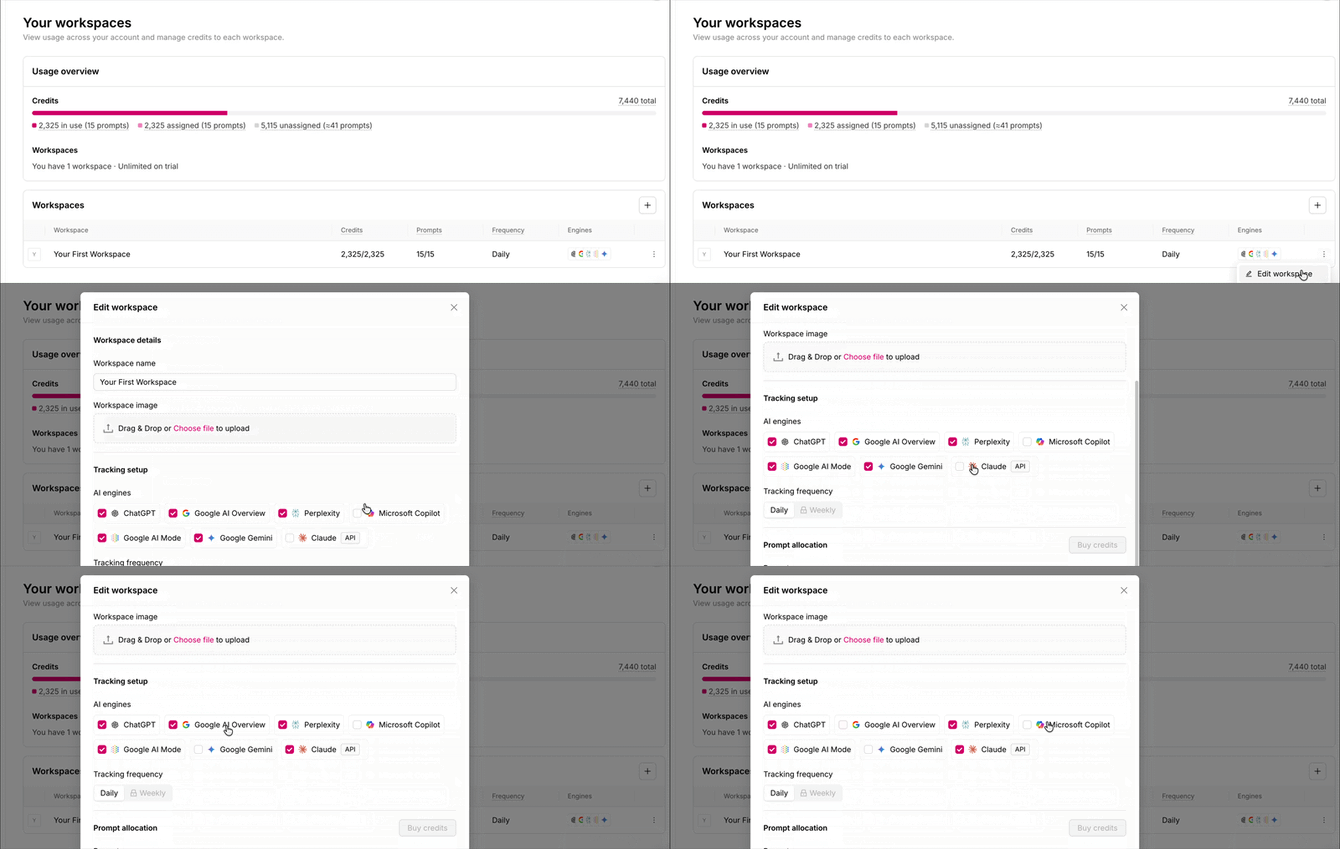
Each workspace has its own engines, so you can track different engines for different markets or clients. More on Workspaces →
How engines change your prompt count
Every engine checks every prompt in the workspace, and each check uses credits. More engines, or adding Claude, means fewer prompts from the same plan.
| Engines (daily) | Lite | Standard | Premium |
|---|---|---|---|
| 3, no Claude | 21 | 161 | 537 |
| 4, no Claude | 16 | 120 | 403 |
| 4 including Claude | 10 | 80 | 268 |
| All 7 | 7 | 53 | 179 |
Frequently asked questions
Can I track fewer than 3 engines? No. Each workspace needs at least 3.
Do I purchase additional engines? No. They're included in every plan; you only choose them.