
Not every bot on your site is there for the same reason. Agent Analytics labels each AI agent with a category so you can tell a real-time, user-driven fetch apart from background crawling. Understanding these categories is the key to interpreting everything else in the dashboard.
This article explains the categories and how they show up in your data. For the full list of individual crawlers, their user-agents, IP ranges, and how to block them, see the AI Crawlers Reference Guide.
The three categories
OtterlyAI groups every recognized agent into one of three categories:
| Category | What it means | Example agents |
|---|---|---|
| On-Demand AI Fetcher | Fetches a page in real time in response to a user's prompt | ChatGPT-User, Claude-User, Perplexity-User, Gemini-Deep-Research, MistralAI-User, Manus-User, Meta-ExternalFetcher |
| Search Index | Crawls to build or refresh a search index | AzureAI-SearchBot, PerplexityBot, OAI-SearchBot, Amzn-SearchBot |
| AI Training / Data Scraper | Crawls to collect training data | GPTBot, GoogleOther, ClaudeBot |
In the Agents tab, you'll be able to filter by Agents or Categories.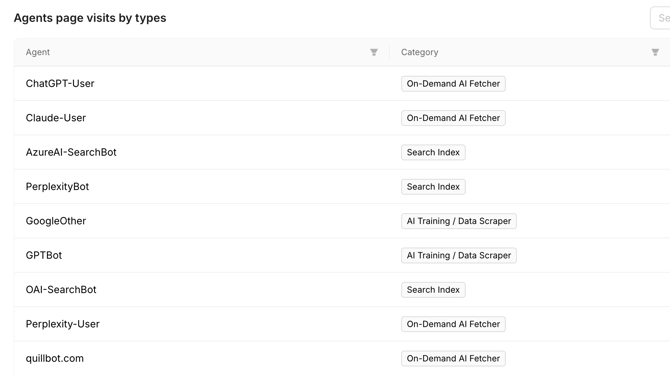
On-Demand AI Fetcher
These agents visit because a real person just asked an AI assistant something and the assistant came to your page to help answer. The user-agent name usually ends in -User (ChatGPT-User, Claude-User, Perplexity-User).
Why it matters most: an on-demand fetch is the closest signal to live visibility you can get from your logs. It means your content was relevant enough to be pulled into an answer at the moment someone asked.
Search Index
These bots crawl your site to build or refresh the search index that an AI product queries when it needs sources. They aren't tied to a single live user, they're maintaining the index that later powers answers and citations.
Why it matters: healthy, regular indexing is what makes your pages eligible to be cited later. If a page is never touched by index bots, it's unlikely to surface in AI answers. Think of this category as the pipeline that feeds future visibility.
AI Training / Data Scraper
These crawlers collect content to train or improve AI models (for example, GPTBot or ClaudeBot). They don't directly drive live answers or citations about your brand.
Why it matters: this is the category most site owners weigh up when deciding what to allow. Training crawls don't help your near-term visibility, so some teams choose to block them while keeping search and on-demand agents allowed. That trade-off, and the exact robots.txt rules, is covered in the AI Crawlers Reference Guide.
Every engine and its agents
Each engine in the filter expands to the specific agents OtterlyAI tracks for it. Here's the full mapping for the headline engines, sorted into the three categories:
| Engine | On-Demand AI Fetcher | Search Index | AI Training / Data Scraper |
|---|---|---|---|
| ChatGPT | ChatGPT-User | OAI-SearchBot | GPTBot |
| Google-Agent, GoogleAgent-Mariner, Gemini-Deep-Research | — | GoogleOther, Google-CloudVertexBot, Google-Extended | |
| Perplexity | Perplexity-User | PerplexityBot | — |
| Microsoft Copilot | — | AzureAI-SearchBot | — |
| Claude | Claude-User, Claude-Code | Claude-SearchBot | ClaudeBot, anthropic-ai, Claude-Web |
💡 Google AI Mode has no dedicated crawler in the engine filter, so it shows no agents of its own.
How categories show up across the dashboard
- Overview → Agents page visits by types labels the top agents with their category, so you can see at a glance whether your traffic is user-driven or background crawling.
- Agents tab shows the category next to every individual bot, alongside its page-visit count.
- Engine filter lets you narrow to a single engine (e.g. ChatGPT) and then read the category mix within it.
💡 A quick rule of thumb: On-Demand Fetchers = someone is asking about you now. Search Index = you're being kept eligible to be cited. Training = your content is being learned from, but not necessarily surfaced.
The "Other" engine group
Beyond the headline engines, OtterlyAI recognizes a large and growing set of crawlers from across the AI ecosystem — and groups them together under Other in the engine filter. This isn't a bucket for unknown traffic: these are named, individually categorized agents that simply don't belong to one of the major engines above.
Each one still carries a category (On-Demand Fetcher, Search Index, or Training / Data Scraper) just like the mainstream engines, so the same reading applies. If you see a large Other share, expand it in the engine filter — or open the Agents tab — to see exactly which crawlers are behind it.
💡 The crawler landscape changes fast and new agents appear regularly. OtterlyAI keeps recognizing and categorizing them, so the three-category framing above scales to the whole list — not just the best-known bots.
Categories vs. engines — don't mix them up
Two different lenses run through Agent Analytics, and it helps to keep them separate:
- Engine = which platform the agent belongs to. The engine filter covers ChatGPT, Google, Perplexity, Microsoft Copilot, Claude, and Other. Each engine can be expanded in the filter to reveal its individual agents.
- Category = why that agent is visiting (on-demand, indexing, or training).
A single engine usually operates agents in all three categories: OpenAI, for instance, runs ChatGPT-User (on-demand), OAI-SearchBot (index), and GPTBot (training). Reading engine and category together is what turns raw crawler hits into a story about your visibility.
Related articles