
Brand Profiling shows you how AI search engines describe your brand compared to your competitors. It reads every mention of your brand across ChatGPT, Google AI Overviews, Google AI Mode, Gemini, Perplexity and Copilot, and turns it into the attributes AI attaches to you, such as affordable, lightweight or outdated. Not a sentiment score: the actual narrative.
Brand Profiling is a tab inside every brand report and is available to all OtterlyAI users. It's generated automatically every 7 days, based on the last 7 days of AI responses in your brand report.
Check out our blog post for more details.
📺 Prefer to watch? Check out our walkthrough video:
Where to find Brand Profiling
Open any brand report and select the Brand Profiling tab.
The page is split into three sections: Brand comparison, How AI describes your brand and Compare all brands.
Brand comparison
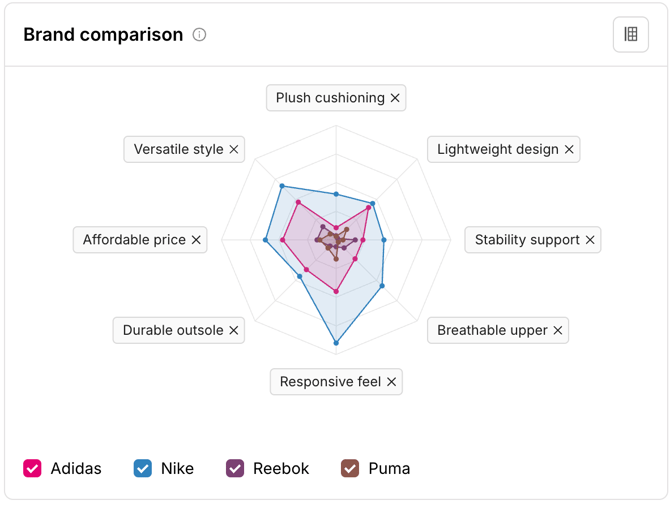
A radar chart that plots your brand across up to 8 attributes at once. Each point shows the share of AI responses mentioning that attribute that credit it to your brand. Add competitors to overlay their shapes on yours.
How to customize the chart:
- Click the column settings icon in the top-right of the section.
- Under Attributes, tick the attributes you want to plot (maximum 8). Or use the Search box to find a specific attribute.
- Under Brands, tick the competitors you want to compare against.
- Or click Reset to go back to the default view.
You can also remove an attribute directly from the chart by clicking the ✓ next to its label.
Use this section to answer: What does my brand's profile look like, and where do competitors overlap or stand apart?
How AI describes your brand
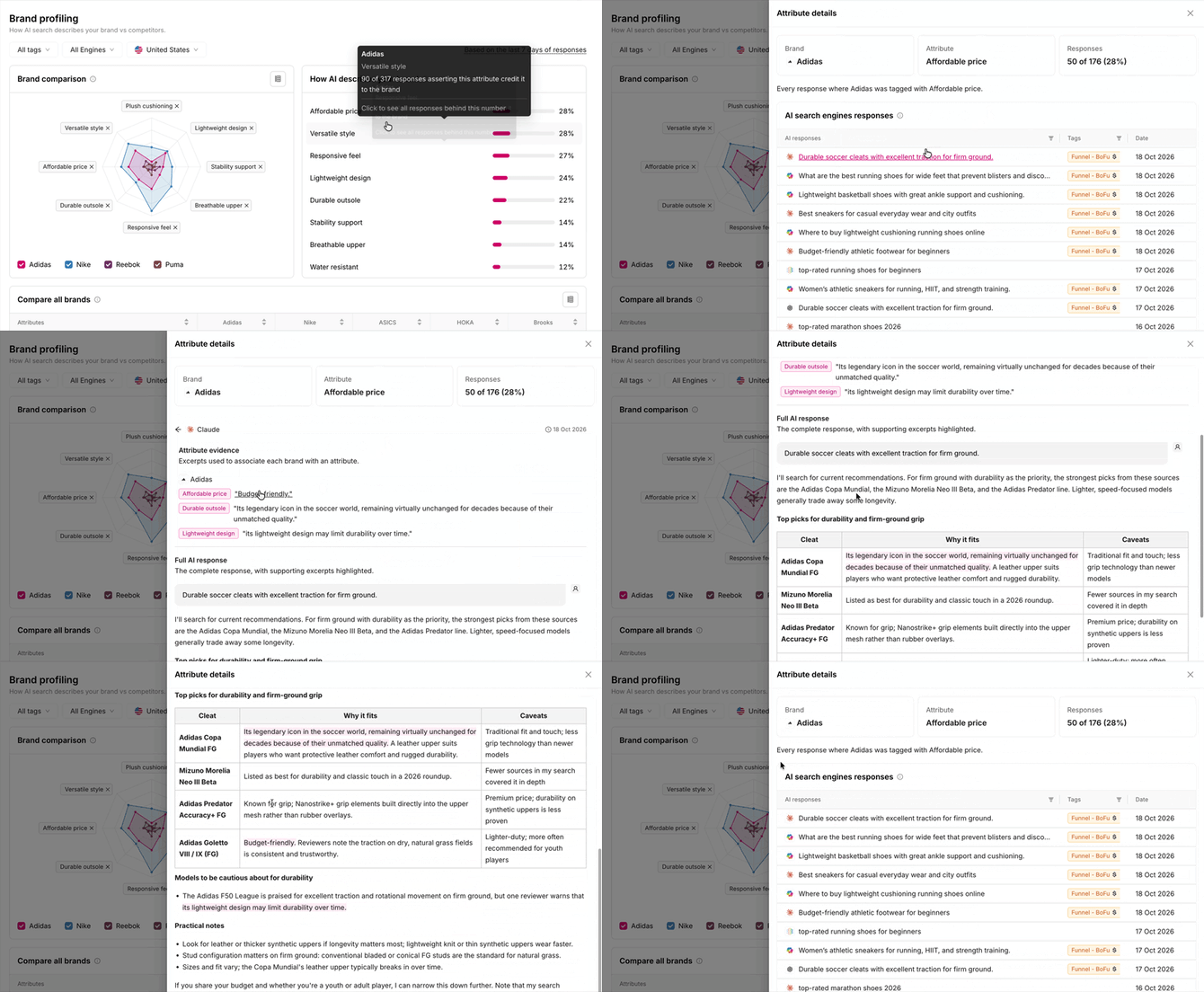
A ranked list of every attribute AI attaches to your brand, strongest first, with the share of responses for each. Every attribute is clickable, so you can trace each score back to the exact AI answers behind it.
How to see the responses behind an attribute:
- Hover over an attribute to see the raw count, e.g. 241 of 963 responses asserting this attribute credit it to the brand.
- Click the attribute to open Attribute details. The top cards show the Brand, the Attribute and the Responses count.
- Browse AI search engines responses: every response where your brand was tagged with that attribute, with the engine, prompt, Tags and Date. Use the filters on the AI responses and Tags columns to narrow the list.
- Click a response to open it. You'll see:
- Attribute evidence: the exact excerpts used to associate each brand in that answer with an attribute, grouped by brand.
- Full AI response: the complete answer, with the supporting excerpts highlighted.
Use this section to answer: Why does AI describe my brand this way, and which prompts, engines and products drive it?
Compare all brands
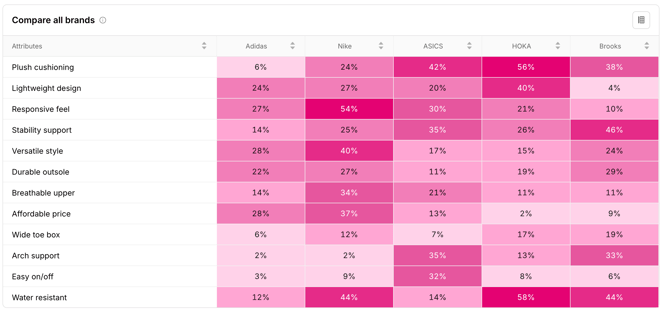
A heatmap table with a row per attribute and a column per brand. Each cell shows the share of AI responses mentioning that attribute that credit it to that brand. Darker cells mean a higher share.
How to adjust the table:
- Click the column settings icon in the top-right of the section.
- Under Attributes, keep Top 6 attributes (the default) or tick the attributes you want to show.
- Under Brands, tick the brands you want as columns.
- Click the arrows in any column header to sort by that brand or attribute.
Use this section to answer: Which competitor owns each attribute in my category, and where do I have the edge?
What can you learn from Brand Profiling?
| Insight | Question it answers |
|---|---|
| The attributes AI associates with you | Which attributes does AI consistently attach to my brand, and how strongly? |
| Your perception gap against competitors | Which attributes do competitors own that I don't, and which strengths aren't breaking through? |
| The objections AI raises | Is AI telling buyers I'm too expensive, not enterprise-ready or lacking support? |
| Differences between engines | Do ChatGPT and Perplexity describe me differently? |
Frequently asked questions
Who can use Brand Profiling? All OtterlyAI customers. It's available as a tab in every brand report.
How often is Brand Profiling updated? Every 7 days, automatically. Each update covers the last 7 days of AI responses in your brand report.
Can I refresh Brand Profiling manually? No. Brand Profiling is generated automatically every 7 days, and there's no manual refresh. This keeps every profile based on a full week of responses.
Can I add attributes manually? Currently this is not possible.
Which competitors can I compare against? The competitors set up in your brand report. To add more, see How can I add more brands and brand variations to a brand report?