
Welcome to OtterlyAI 👋
Your guide to monitoring and improving your brand visibility in AI-powered searches.
1. Why OtterlyAI Matters
Search is changing.
Traditional SEO (Search Engine Optimization) is evolving into AI-driven search - powered by Large Language Models (LLMs) with real-time web search capabilities. This shift has introduced a new discipline: Generative Engine Optimization (GEO).
In this new era, classic KPIs like traffic, visitors, backlinks, and engagement are giving way to brand visibility — specifically:
How often does your brand appear in relevant AI search answers to the questions your customers are asking?
OtterlyAI helps you:
-
Track your brand visibility in AI search results.
-
Compare your visibility against competitors.
-
Identify content gaps to improve your presence in AI-powered answers.
2. How OtterlyAI Works
-
Monitors AI search engines:
We send your search prompts to leading AI-powered search experiences, including:-
Google AI Overviews / AI Mode
-
ChatGPT
-
Perplexity AI
-
Gemini
-
Microsoft Co-Pilot
-
-
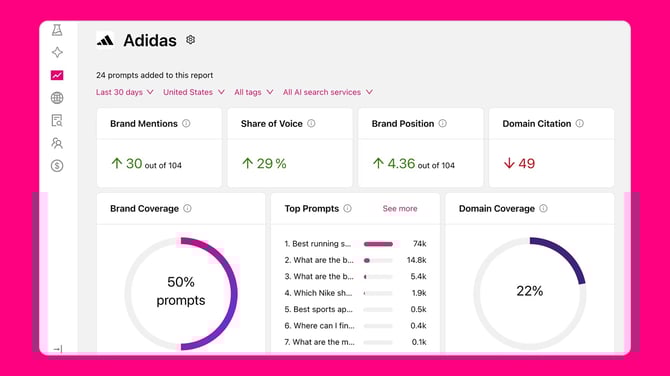
Analyzes answers for brand mentions:
-
Detects whether your brand (or your competitors) is cited in AI-generated answers.
-
Tracks citation links — the web pages used by AI systems to provide accurate, up-to-date responses.
-
-
Generates actionable insights:
-
Brand visibility stats for you and your competitors.
-
Missing content opportunities to increase your presence in AI search results.
-
3. Getting Started in OtterlyAI
Follow these steps to set up your account and start tracking your visibility:
Step 1 — Sign Up
Go to otterly.ai/signup and create your account.
Step 2 — Complete Onboarding
-
Create your first set of search prompts.
-
Use your top SEO keywords and other customer-relevant queries.
-
Think like your customers — what questions would they ask to find your product or service?
Step 3 — Review Your First Brand Report
-
OtterlyAI will process your prompts and generate brand KPIs.
-
Compare your performance against competitors.
-
See visibility scores by search prompt.
Step 4 — Set Country Context
-
Each search prompt can target a specific country.
-
Country-specific results are crucial because AI search answers often vary by region.
Step 5 — Expand Your Tracking
-
Add more brand reports for you or competitors.
-
Add more prompts through:
-
Search Prompts
-
AI Keyword Research (our smart prompt idea generator)
-
Step 6 — Run a GEO Audit
-
Our GEO audit analyzes your website’s AI search readiness.
-
Get a technical checklist to optimize your content for AI crawlers.
4. Resources & Tools
In the Help Center you’ll find:
-
Free GEO Guide — 15 proven methods to improve AI search visibility.
-
Custom GEO GPTbot — an AI assistant trained on the GEO Guide.
-
Google Looker Studio Template — visualize AI search traffic to your site (GA4 required).
5. Team Collaboration
You can add teammates anytime:
-
Go to Team Management in the navigation menu.
-
Invite members to view reports, manage prompts, and collaborate on GEO improvements.
6. Next Steps
✅ Sign up and set your first prompts.
✅ Review your brand report and competitor data.
✅ Start closing content gaps to win in AI search.