
Single Sign-On (SSO) is available for Enterprise users of OtterlyAI. If you’re interested in enabling SSO for your organization, please contact us at hello@otterly.ai to begin the setup process and receive integration-specific guidance. OtterlyAI supports SAML 2.0-based Single Sign-On.
Below are the steps to configure SSO:
Step 1: Provide Identity Provider (IdP) Information
To initiate the setup, you will need to share your Identity Provider details. You can provide this in one of the following formats:
-
An IdP metadata file containing all relevant configuration details
OR
-
The following information as raw data:
-
SSO URL
-
Entity ID
-
Certificate
-
This information is required to configure the integration within our authentication system (Clerk).
Step 2: Receive the OtterlyAI Configuration Details
Once we have your IdP information, the OtterlyAI team will provide you with the following:
-
ACS (Assertion Consumer Service) URL
-
Entity ID
-
Metadata URL
These attributes are provided from our endpoint.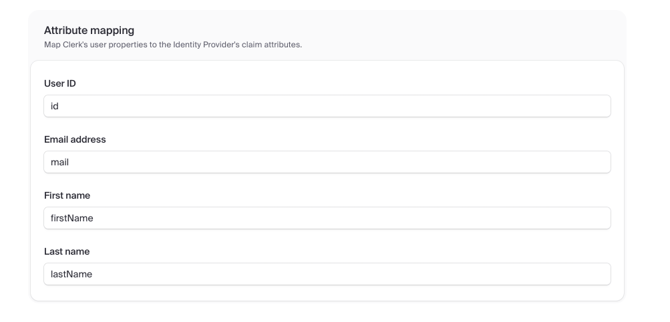
Note: The only required attribute is “mail”.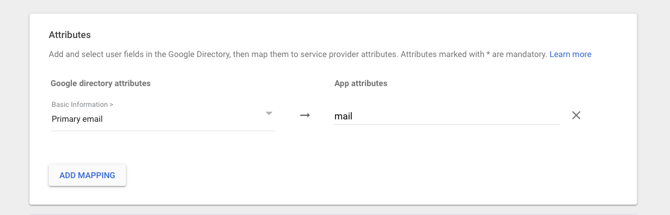
Step 3: Integration Completion
The OtterlyAI team will process the setup and confirm once the SSO integration is successfully enabled.
Logging in with SSO
Once SSO is activated, you can log in by:
Entering the email address on the login page
Clicking “Sign in with SSO”-Mar-18-2026-08-03-50-0286-PM.png?width=670&height=537&name=Screenshot%20(4)-Mar-18-2026-08-03-50-0286-PM.png)