
Recommendations is a built-in feature inside your brand report that gives you actionable, prioritized steps to improve your brand's visibility across AI search engines like ChatGPT, Perplexity, and Google AI Overview. Instead of manually analyzing your data, OtterlyAI surfaces the most impactful things you can do automatically.
Where to find AI Recommendations
Inside your brand report, click on Recommendations in the left-hand navigation. You will see three tabs at the top. Please kindly note that the Viewer role is not able to see the recommendations:
- Suggested - All automatically generated recommendations for your brand, sorted by impact (high to low) by default.
- To-Do - Recommendations you have decided to act on. You can also add internal notes here to coordinate with your team.
- Archive - Recommendations that have been marked as completed.
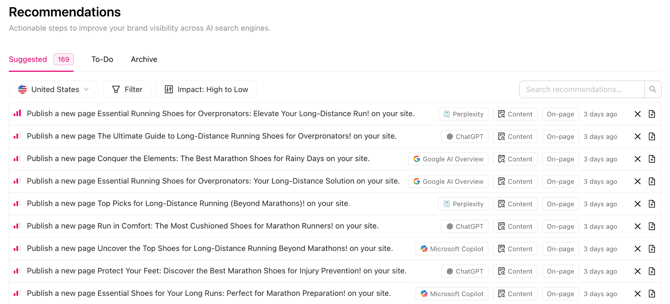
Working with recommendations
Opening a recommendation
Click on any recommendation to expand it. Inside, you will find:
- Reasoning - Why OtterlyAI flagged this as an opportunity, based on your data
- Suggestion - A concrete action you can take to address the gap.
-Apr-15-2026-03-34-10-4391-PM.png?width=670&height=474&name=Screenshot%20(3)-Apr-15-2026-03-34-10-4391-PM.png)
Moving a recommendation to To-Do
If you want to act on a recommendation, click Add to To-Do. It will appear in the To-Do tab where you and your team can add internal notes to track progress, assign context, or leave reminders.
Completing or discarding a recommendation
Once you have taken action, mark the recommendation as completed directly from the To-Do tab - it will automatically move to Archive. You'll also have to add this recommendation as an annotation on Brand performance over time chart.
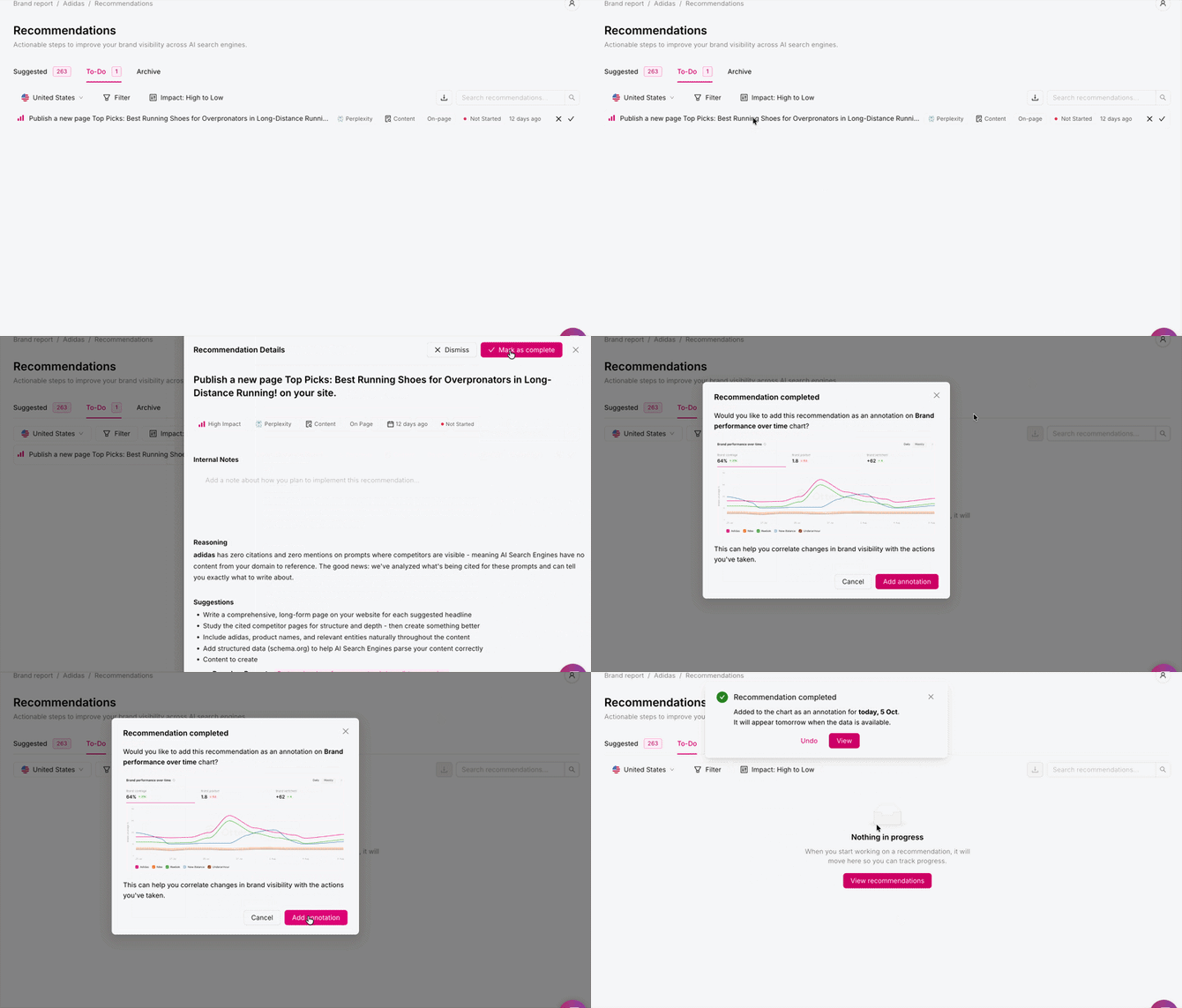
If a recommendation is not relevant for your brand, you can discard it from the Suggested tab and it will no longer appear.
In our dedicated blog post you can find more information regarding recommendations along with a walkthrough video.
Filtering recommendations
You can narrow down the recommendations list using the following filters. You can also sort by date and search for specific keywords using the search bar.
|
Filter |
What it does |
Options |
|
AI Search Engine |
Filter by the specific engine a recommendation relates to |
ChatGPT, Perplexity, Google AI Overview, Microsoft Copilot |
|
Type |
Filter by the type |
Prompts, Crawlability, Entity, Content Partnership, Reddit, News & Media, YouTube, Social Media, Content |
|
Area |
Filter by where the action takes place |
General, On-Page, Off-Page |
|
Impact |
Filter by priority level |
High, Medium, Low |
Quick Reference: All Recommendation Types
The table below lists every recommendation type OtterlyAI can generate, what triggers it, and where it applies.
|
# |
Name |
Type |
Area |
Key Trigger |
|
1 |
Prompt Count |
Prompts |
General |
Fewer than 15 prompts per country |
|
2 |
Branded Prompts |
Prompts |
General |
Any branded prompt exists |
|
3 |
ToFu Prompts |
Prompts |
General |
More than 10% TOFU prompts |
|
4 |
Crawlability Check |
Crawlability |
General |
0 domain citations on an AI engine |
|
5 |
Brand Mention Check |
Entity |
General |
0 brand mentions across all prompts |
|
6 |
Content Partnerships |
Content Partnership |
Off-Page |
Competitor cited on blog/brand, not your brand |
|
7 |
Reddit Conversations |
|
Off-Page |
Competitor cited on Reddit, not your brand |
|
8 |
Media Article Inclusion |
News & Media |
Off-Page |
Competitor cited in media, not your brand |
|
9 |
Say Thank You (Media) |
News & Media |
Off-Page |
Your brand IS cited in media |
|
10 |
Write a Press Release |
News & Media |
Off-Page |
Competitor visible on high-volume prompts |
|
11 |
Create YouTube Videos |
YouTube |
Off-Page |
Competitor cited in video sources |
|
12 |
Collaborate with YouTubers |
YouTube |
Off-Page |
Competitor cited in video sources |
|
13 |
Social Media Conversations |
Social Media |
Off-Page |
Competitor cited on social, not your brand |
|
14 |
Create Content On-Page |
Content |
On-Page |
0 mentions + 0 citations, competitor visible |
|
15 |
Improve Existing Content |
Content |
On-Page |
0 mentions, but domain ranks on Google |
Frequently Asked Questions
Why am I not seeing any recommendations?
Recommendations are generated automatically as soon as a brand report is created with prompts attached. However, a few conditions need to be met before the first recommendations appear:
- 15 or more prompts added to the brand report
- 3 or more competitors defined
- At least 3 days of data collected on the attached prompts (i.e., at least 3 runs completed)
Once those conditions are met, recommendations are refreshed every 7 days on a recurring basis.
Recommendations are available on all plans, but the depth of access varies:
- Lite – A preview only: up to 3 recommendations per 7-day cycle
- Standard / Premium – Full access to all recommendations
How are recommendations prioritized?
Recommendations are sorted by impact: High, Medium, or Low based on the potential visibility gain for your brand. However, you can sort by date, area or type.
Can I add notes to a recommendation?
Yes. Once a recommendation is in your To-Do tab, you can add internal notes directly on it. This is useful for leaving context for teammates or tracking what action was taken.
How often are recommendations refreshed?
After the initial conditions are met, recommendations are automatically refreshed every 7 days.
Can I connect the To-Do tab to my own task management system?
Not currently. At this time, recommendations cannot be synced to external task management tools.
Can I export the recommendations?
Yes, you can export the recommendations from the dashboard. The button is next to the search bar in the Recommendations tab.-4.png?width=670&height=154&name=Screenshot%20(8)-4.png)
You can also use our API/MCP to pull the recommendations data. See here.
Why do I get a recommendation to get my brand mentioned on a competitor's site?
Some brands publish listicles or comparison pages that mention their competitors and AI engines frequently cite these pages. If this tactic doesn't fit your strategy, you can simply discard the recommendation. Please also keep in mind that Recommendations is currently in beta, the relevance and precision of recommendations will continue to improve over time.
Do I have to act on all the recommendations?
No. Recommendations are there to guide you, not to create an obligation. Focus on the ones that are most relevant and valuable for your brand and ignore or discard the rest.
Can I add my own recommendations?
Not currently. Recommendations are generated automatically based on your brand data. Custom recommendations are not supported at this time.
How do I turn off the notifications?
You can manage (disable/enable) the notifications from the brand report settings. By clicking on the gear icon in the upper right corner of the brand report, you'll notice Notifications tab. There you'll be able to turn them on or off, depending on your preferences.-May-06-2026-05-13-26-8032-PM.png?width=670&height=315&name=Screenshot%20(2)-May-06-2026-05-13-26-8032-PM.png)
Note: If you have feedback or suggestions, we'd love to hear from you! Reach out to us via the in-app chat or at support@otterly.ai.